 Ask LUDIA
UDL Access and Aiming for ALL Crosswalk
Resources from Pathway 3: Accessibility for Learning Communities
About This Crosswalk
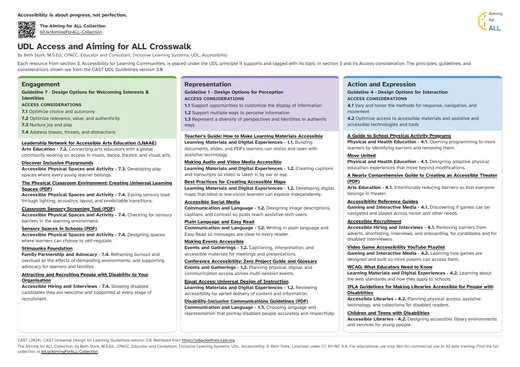
Each resource from pathway 3, Accessibility for Learning Communities, sits under the UDL principle it supports. Each one is tagged with its pathway 3 topic and its Access consideration. The principles, guidelines, and considerations shown are from the CAST UDL Guidelines version 3.0.
Source: CAST (2024). CAST Universal Design for Learning Guidelines version 3.0. Retrieved from https://udlguidelines.cast.org. The principle, guideline and consideration names on this page are CAST's own words. The UDL Guidelines are © CAST.
How to Use the Crosswalk
- Keep this page open, or download the PDF version.
- Open the collection on the Aiming for ALL page or in the Wiki.
- Go to pathway 3, Accessibility for Learning Communities. The contents there run A to J, from accessible physical spaces and activity through to gaming and interactive media.
- Keep the crosswalk open alongside it. Every resource is listed under the UDL principle it supports, with its part letter and its Access consideration.
- Use it when you spot a barrier to access. The resources show practical ways to reduce that barrier. Many cover barriers outside the classroom.
Show Resources by Topic
Choose a topic from pathway 3, Accessibility for Learning Communities, to see only its resources. Choose All to see every resource again.
Engagement
Guideline 7 · Design Options for Welcoming Interests & Identities
Access considerations
- 7.1 Optimize choice and autonomy
- 7.2 Optimize relevance, value, and authenticity
- 7.3 Nurture joy and play
- 7.4 Address biases, threats, and distractions
Resources for Engagement
Leadership Network for Accessible Arts Education (LNAAE) (opens in a new tab)
Connecting arts educators with a global community working on access in music, dance, theatre, and visual arts.
See it in pathway 3: Leadership Network for Accessible Arts Education (LNAAE)
Discover Inclusive Playgrounds (opens in a new tab)
Developing play spaces where every young learner belongs.
The Physical Classroom Environment: Creating Universal Learning Spaces (PDF) (opens in a new tab)
Easing sensory load through lighting, acoustics, layout, and predictable transitions.
See it in pathway 3: The Physical Classroom Environment: Creating Universal Learning Spaces (PDF)
Classroom Sensory Screening Tool (PDF) (opens in a new tab)
Checking for sensory barriers in the learning environment.
Sensory Spaces in Schools (PDF) (opens in a new tab)
Designing spaces where learners can choose to self-regulate.
Stimpunks Foundation (opens in a new tab)
Reframing burnout and overload as the effects of demanding environments, and supporting advocacy for learners and families.
Attracting and Recruiting People with Disability to Your Organisation (2024) (opens in a new tab)
Showing disabled candidates they are welcome and supported at every stage of recruitment.
See it in pathway 3: Attracting and Recruiting People with Disability to Your Organisation (2024)
No resources from this topic sit under Engagement.
Representation
Guideline 1 · Design Options for Perception
Access considerations
- 1.1 Support opportunities to customize the display of information
- 1.2 Support multiple ways to perceive information
- 1.3 Represent a diversity of perspectives and identities in authentic ways
Resources for Representation
Teacher's Guide: How to Make Learning Materials Accessible (opens in a new tab)
Building documents, slides, and PDFs learners can resize and open with assistive technology.
See it in pathway 3: Teacher's Guide: How to Make Learning Materials Accessible
Making Audio and Video Media Accessible (opens in a new tab)
Creating captions and transcripts so video is taken in by ear or eye.
See it in pathway 3: Making Audio and Video Media Accessible
Best Practices for Creating Accessible Maps (opens in a new tab)
Developing digital maps that blind or low-vision learners can explore independently.
See it in pathway 3: Best Practices for Creating Accessible Maps
Accessible Social Media (opens in a new tab)
Designing image descriptions, captions, and contrast so posts reach assistive-tech users.
Plain Language and Easy Read (opens in a new tab)
Writing in plain language and Easy Read so messages are clear to every reader.
Making Events Accessible (opens in a new tab)
Captioning, interpretation, and accessible materials for meetings and presentations.
Conference Accessibility: Zero Project Guide and Glossary (opens in a new tab)
Planning physical, digital, and communication access across multi-session events.
See it in pathway 3: Conference Accessibility: Zero Project Guide and Glossary
Equal Access: Universal Design of Instruction (opens in a new tab)
Reviewing accessibility for varied delivery of content and information.
See it in pathway 3: Equal Access: Universal Design of Instruction
Disability-Inclusive Communications Guidelines (PDF) (opens in a new tab)
Choosing language and representation that portray disabled people accurately and respectfully.
See it in pathway 3: Disability-Inclusive Communications Guidelines (PDF)
No resources from this topic sit under Representation.
Action and Expression
Guideline 4 · Design Options for Interaction
Access considerations
- 4.1 Vary and honor the methods for response, navigation, and movement
- 4.2 Optimize access to accessible materials and assistive and accessible technologies and tools
Resources for Action and Expression
A Guide to School Physical Activity Programs (opens in a new tab)
Opening programmes to more learners by finding and removing barriers.
See it in pathway 3: A Guide to School Physical Activity Programs
Move United (opens in a new tab)
Designing adaptive physical education that goes further than modifying activities.
A Nearly Comprehensive Guide to Creating an Accessible Theater (PDF) (opens in a new tab)
Intentionally reducing barriers so that everyone belongs in theatre.
See it in pathway 3: A Nearly Comprehensive Guide to Creating an Accessible Theater (PDF)
Accessibility Reference Guides (opens in a new tab)
Discovering if games can be navigated and played across motor and other needs.
Accessible Recruitment (opens in a new tab)
Removing barriers from adverts, shortlisting, interviews, and onboarding, for candidates and for disabled interviewers.
Video Game Accessibility YouTube Playlist (opens in a new tab)
Learning how games are designed and built so more players can access them.
See it in pathway 3: Video Game Accessibility YouTube Playlist
WCAG: What Educators Need to Know (opens in a new tab)
Learning about the web standards and how they apply to schools.
IFLA Guidelines for Making Libraries Accessible for People with Disabilities (opens in a new tab)
Planning physical access, assistive technology, and collections for disabled readers.
See it in pathway 3: IFLA Guidelines for Making Libraries Accessible for People with Disabilities
Children and Teens with Disabilities (opens in a new tab)
Designing accessible library environments and services for young people.
No resources from this topic sit under Action and Expression.
The Aiming for ALL Collection, by Beth Stark, M.S.Ed., CPACC, Educator and Consultant, Inclusive Learning Systems, UDL, Accessibility. © Beth Stark. Licensed under CC BY-NC 4.0. Web version: bethstark.org/aiming-for-all/crosswalk.html
Principles, guidelines, and considerations: CAST (2024). CAST Universal Design for Learning Guidelines version 3.0. Retrieved from https://udlguidelines.cast.org (opens in a new tab)